Glowing text generator

Neon signs, soft halos, and fire. make your words shine. free.

Pick a style to start. You can change everything.
1080 × 1080

Drag the text to move it. Pull the round dots to turn or resize.Drag to move. Pinch with two fingers to resize and turn.

Private by design. Your photos and words stay in your browser. Nothing is uploaded to our servers.

How to Make Glowing Text

1

Pick a Glow Style

Click one of the 8 styles above the canvas. Each one has a font, a glow color, and a dark background ready to go.

2

Type Your Words

Open the Text tab and type. Short words glow best. Pick a bold font, or a script font for a classic sign.

3

Change the Glow

Open the Glow tab. Pick a glow color, then slide the size and strength. For a real neon look, keep the letters almost white.

4

Add a Photo and Download

To use a photo, open the Background tab, add one, and slide Make photo darker. Then press Download.

What Is a Glowing Text Generator?

Glowing text looks like it gives off light. Think of a neon sign at night. The center of each letter is bright, and a soft colored light spreads out around it.

This generator makes that look for you. Pick a color, and slide two bars to choose how big and how strong the glow is. You can use one glow color or two. You can put the text on a dark color or on your own photo.

It is free. There is no sign up and no watermark. The picture you make is a still image you can save as a PNG, JPG, or WebP.
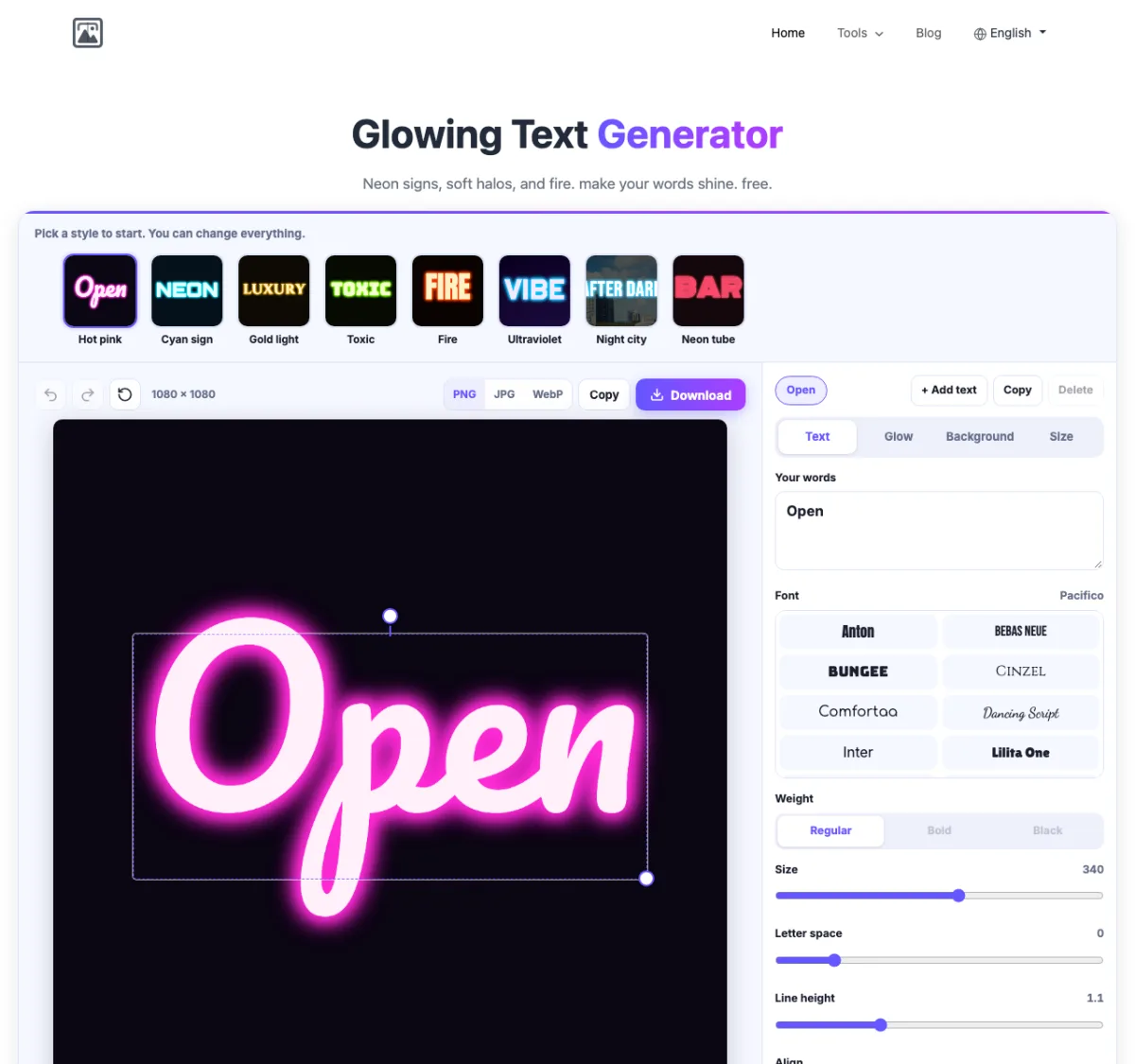
The free glowing text generator tool with ready-made styles, a live preview, and simple controls
A Glow You Control - glowing text generator feature

A Glow You Control

Pick the glow color. Slide the size from a small shine to a big halo. Slide the strength to make it soft or bright.

Two-Color Glow - glowing text generator feature

Two-Color Glow

Turn on a second color for the outer glow. Pink with blue, or red with gold, gives a rich, deep look.

Neon Tube Look - glowing text generator feature

Neon Tube Look

Show only the outline of the letters, and add a glow to it. It looks like real glass tubes on a sign.

Glow on Your Photo - glowing text generator feature

Glow on Your Photo

Upload a photo, then make it darker with one slider. The glow pops on a dim photo, like a city at night.

8 Ready-Made Styles - glowing text generator feature

8 Ready-Made Styles

Hot pink, Cyan sign, Gold light, Toxic, Fire, Ultraviolet, Night city, and Neon tube. Click one and type your own words.

Free and Private - glowing text generator feature

Free and Private

No account. No watermark. Your photos and words stay in your browser and are never uploaded. Download as PNG, JPG, or WebP.

Frequently asked questions

Pick a style, type your words, and open the Glow tab. Choose a glow color and slide the size and strength. The glow shows up right away.

Make the letters almost white and the glow a bright color. Use a very dark background. A script font or a thick sans font works well.

Yes. Add your photo in the Background tab. Then slide Make photo darker. The glow looks best on a dark photo.

Yes. Turn on Use two glow colors. The first color is close to the letters. The second color is the outer glow.

No. The download is a still picture. You can save it as a PNG, JPG, or WebP.

Yes. In the Background tab, choose None. Then download a PNG. The glow keeps its soft edges on top of any dark picture.

Yes. There is no sign up and no watermark. Your photos and words stay in your browser.

The Secret to a Good Glow

A real neon sign has a bright center and a colored halo. To copy that, make the letters very light, like white or pale pink. Then make the glow a strong color, like hot pink or cyan.

If the letters and the glow are the same color, the text looks flat. The light core is what makes it look lit.

Dark backgrounds make the glow look brighter. That is why neon signs look best at night.

Glow Styles and When to Use Them

  • Hot pink and cyan: classic neon for bars, parties, and music.
  • Gold light: for fancy words like luxury, gala, or night.
  • Toxic green: for games, tech, and spooky posts.
  • Fire (orange with red): for sports, food, and loud headlines.
  • Ultraviolet (purple with blue): for gaming, space, and dreamy posts.
  • Neon tube: only the outline glows. It looks like a real sign.

Tips for Photos

Pick a photo with a dark or calm sky, a street at night, or a plain wall. Slide Make photo darker until the glow stands out. Then place the text where the picture is quiet.

A little blur on the photo can also help. It keeps the eye on the words.

More free tools to try

All free, no sign-up — same photo works across every tool

Recent Posts

🔖

Save TextBehindImg

Press Ctrl+D (or ⌘D on Mac) to bookmark and come back anytime, it's free forever.