Drag the photo to move it. Pinch or scroll to zoom. Put the top of the head on the dotted line and the chin in the green band.
Print the sheet at 100% size on photo paper. Do not pick "fit to page". A 4 × 6 print costs very little at most pharmacies and photo shops.
We follow the published rules, but only the passport office can approve a photo. Always check the latest rules on the official government website before you apply.
Private by design. Your photo never leaves your device. The AI runs right in your browser.
Face the camera in daylight. Keep your ears visible, your eyes open, and your mouth closed. Take off dark glasses and caps.
India passport (35 × 45 mm) is already picked. If your form asks for 2 × 2 inch, choose India 2 × 2 inch from the list.
The AI adds a pure white background and sizes your face. Use the guides to fine-tune.
Download the digital photo for an online form, or the A4 sheet to print at any photo studio.
What Does an Indian Passport Photo Need?
An Indian passport photo needs a plain white background. Your face should fill most of the photo, with your ears showing, your eyes open, and your mouth closed. The most common size is 35 by 45 mm. Some forms, such as OCI and some Indian missions abroad, ask for a square 2 by 2 inch photo instead.
This tool makes both. Pick India passport (35 × 45 mm) or India 2 × 2 inch. Upload a photo, and our AI gives you a clean white background and sizes your face. Download a digital file, or an A4 or 4 × 6 sheet to print at a photo shop.
Rules can change, so always check the instructions for your form on Passport Seva. The tool is free, and your photo stays on your phone.
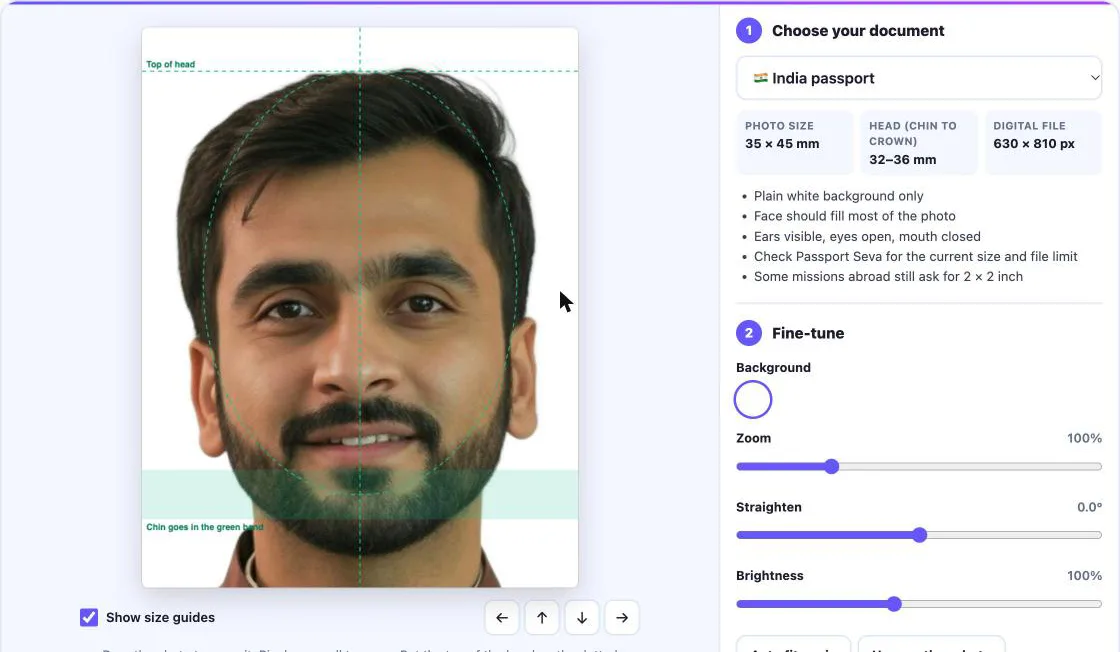
The tool puts a clean white background behind you. Shadows are removed.
The tool sizes your head to the range, and your face fills most of the photo.
See that your head is centered, and that the photo is sharp enough to print.
Download an A4 sheet with many photos. Print it once and cut them out.
Get a digital file for Passport Seva and other online forms.
Pick the 2 × 2 inch size from the list if your form, OCI, or mission asks for it.
Indian passport and visa rules have changed in recent years, and different offices can ask for different sizes. Before you print or upload, read the photo instructions for your form on the official Passport Seva website, or on your Indian mission's site if you live abroad. Then pick the matching size in the tool.
All free, no sign-up — same photo works across every tool
Save TextBehindImg
Press Ctrl+D (or ⌘D on Mac) to bookmark and come back anytime, it's free forever.