Us passport photo 2 × 2 inch

Make a 2 × 2 inch US passport photo at home. Free. Print it for under a dollar.

Add your photo Face the camera. Plain light, no hat. Any background is fine. We remove it.

Drag the photo to move it. Pinch or scroll to zoom. Put the top of the head on the dotted line and the chin in the green band.

1 Choose your document
Photo size
Head (chin to crown)
Digital file
    2 Fine-tune
    Background
      3 Download

      Print the sheet at 100% size on photo paper. Do not pick "fit to page". A 4 × 6 print costs very little at most pharmacies and photo shops.

      We follow the published rules, but only the passport office can approve a photo. Always check the latest rules on the official government website before you apply.

      Private by design. Your photo never leaves your device. The AI runs right in your browser.

      How to Make a US Passport Photo

      1

      Take the Photo

      Stand about 4 feet from the camera in soft daylight. Take off your glasses. Look straight ahead with a neutral face or a small natural smile.

      2

      Upload It

      US passport is already picked. Upload your photo. The AI makes the background white and sizes your head to 1 to 1⅜ inches.

      3

      Check the Guides

      The top of your head should touch the dotted line. Your chin should sit in the green band. Drag or zoom to fix it.

      4

      Download or Print

      Download the 600 × 600 px JPG for online renewal. Or download the 4 × 6 sheet and print it at Walgreens, CVS, Walmart, or any photo shop.

      What Does a US Passport Photo Need?

      A US passport photo is a square, 2 by 2 inches (51 by 51 mm). Your head, from your chin to the top of your head, must be between 1 inch and 1⅜ inches tall. The background must be white or off-white. You cannot wear glasses, and the photo must be from the last 6 months.

      This tool sets all of that up for you. Add a photo you took at home. Our AI makes the background white and sizes your head to fit. Then download a digital file for online renewal, or a 4 × 6 inch sheet with photos to print at a pharmacy.

      It is free, with no sign up and no watermark.
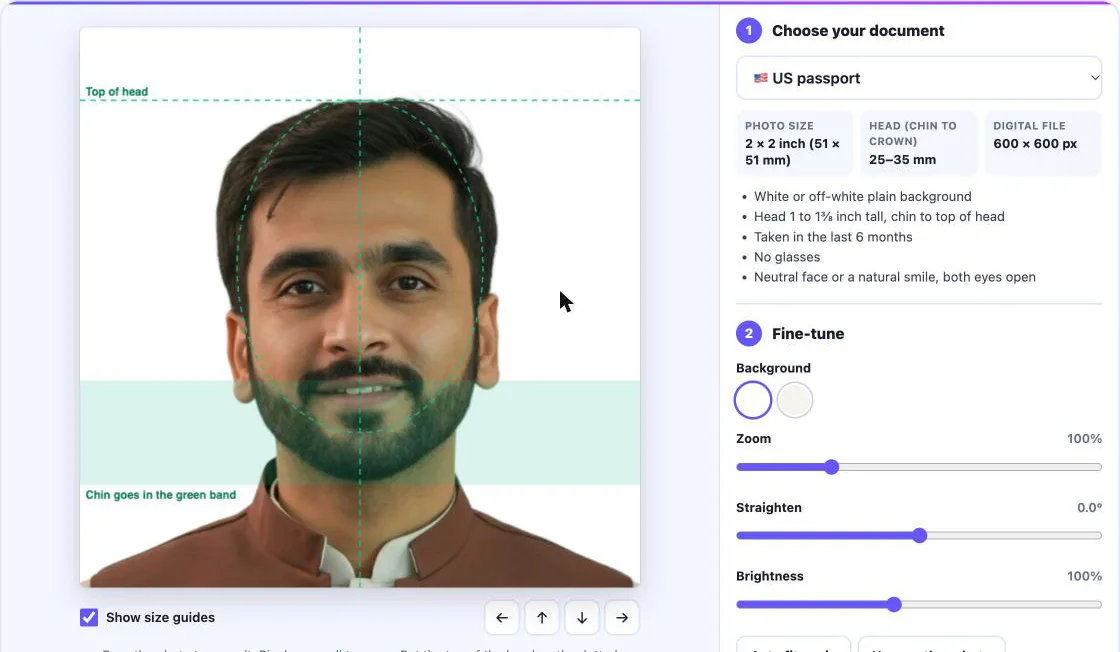
      Free us passport photo tool with a live preview and simple steps
      White Background, Done for You - us passport photo feature

      White Background, Done for You

      Take your photo anywhere. The tool swaps your wall for plain white, the color US passport rules ask for.

      2 × 2 Inch, Head 1 to 1⅜ Inch - us passport photo feature

      2 × 2 Inch, Head 1 to 1⅜ Inch

      The tool finds your head and sizes it so chin to crown is 1 to 1⅜ inches (25 to 35 mm).

      Check It Before You Print - us passport photo feature

      Check It Before You Print

      See your head size, whether you are centered, and whether the photo is sharp enough for a print.

      A Print Sheet for a Few Cents - us passport photo feature

      A Print Sheet for a Few Cents

      Download a 4 × 6 inch sheet of 2 × 2 photos. Print it at a pharmacy or photo shop.

      Square JPG for Online Renewal - us passport photo feature

      Square JPG for Online Renewal

      Need a digital photo? Download a 600 × 600 pixel JPG for online forms.

      No Sign Up, No Watermark - us passport photo feature

      No Sign Up, No Watermark

      The photo stays on your phone or computer. Nothing is uploaded.

      Frequently asked questions

      2 × 2 inches (51 × 51 mm). The head, from chin to the top of the head, must be 1 to 1⅜ inches (25 to 35 mm).

      Yes. The State Department accepts photos you take yourself if they meet all the rules. A friend or a timer works better than an arm's-length selfie.

      No. Glasses are not allowed in US passport photos, except in rare medical cases with a signed doctor's note.

      Yes, a natural smile is fine. Keep both eyes open. A neutral face is the safest choice.

      A digital photo that meets the same rules. Our download is a square JPG at 600 × 600 pixels with a white background.

      Download the 4 × 6 sheet. It holds several 2 × 2 photos. Print it as a regular 4 × 6 photo at a pharmacy or photo shop, then cut along the lines. Print at actual size.

      No tool can promise that. We match the size, head height, and background rules. Good light, no shadows, and a straight face are up to you.

      US Passport Photo Rules at a Glance

      • Size: 2 × 2 inches (51 × 51 mm).
      • Head: 1 to 1⅜ inches (25 to 35 mm) from chin to top of head.
      • Background: plain white or off-white, with no shadows.
      • Glasses: not allowed.
      • Age: taken in the last 6 months.
      • Face: looking straight at the camera, both eyes open, neutral face or natural smile.
      • No filters or edits that change how you look. Our tool only changes the background and the crop.

      How to Take a Good Passport Photo at Home

      • Stand about 4 feet from the camera. Use a timer or ask a friend to help.
      • Face a window in daylight so the light falls evenly on both sides of your face.
      • Take off your glasses. US passport photos do not allow them, except in rare medical cases.
      • Look at the camera with a neutral face or a natural smile. Keep both eyes open.
      • Wear everyday clothes. Uniforms are not allowed. Skip a white top, since the background is white.
      • Do not use filters or edit your face. The photo must be new, taken in the last 6 months.
      • Print on photo paper at 100% size. Do not use fit to page, or your head will be the wrong size.

      Where to Check the Official Rules

      The US Department of State posts the full photo rules on its website, travel.state.gov. Rules can change, so take a quick look before you apply. If you need a photo for a US visa instead, use our US visa photo maker, which can keep the file under 240 KB.

      More free tools to try

      All free, no sign-up — same photo works across every tool

      Recent Posts

      🔖

      Save TextBehindImg

      Press Ctrl+D (or ⌘D on Mac) to bookmark and come back anytime, it's free forever.